Inconsolata - a nice programming font
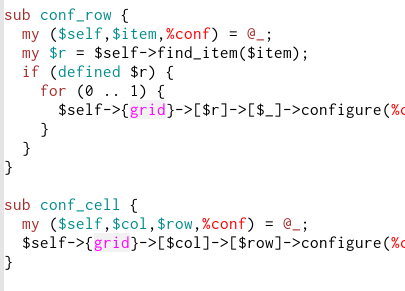
My current favorite Emacs*font to work with the new XFT backend is Inconsolata. I've tried a few others, but this font is just very clear, not too fat and not too skinny, and it has a slashed zero, as a programming font should.
There's a debian package too, called "ttf-inconsolata". ** See update below.
Screenshot:

Update: the current debian ttf-inconsolata has a bug somewhere that means you can't actually use the font. A simple remedy is to install the ttf-inconsolata package and then symlink /usr/share/fonts/truetype/ttf-inconsolata/Inconsolata.ttf to /usr/share/fonts/truetype/ttf-inconsolata/Inconsolata.otf
This may not be technically correct, but it does work.
Also, on my current emacs CVS builds, I need to add the following to my .Xresources to get the anti-aliasing to work reliably:
Emacs.FontBackend: xft
Tags: emacs english
February 26th, 2008 at 22:02
Ooooh mooi! Die ga ik ook proberen. Dank voor de tip.
March 20th, 2008 at 19:03
Looks a lot like the monaco font I use on my Mac. I love it.
June 16th, 2008 at 17:06
I really like the stroked zero but it still bears another regular oops: too subtle difference between the small letter l and the number 1. If it would have that fixed then I would rate it 9 out of 10 at least.
October 12th, 2008 at 07:10
Ubuntu Hardy (8.04) also has a ttf-inconsolata package, which works without a symlink. I really like the font on first impression. I set it for xterm with the following (in .Xresources or .Xdefault, as appropriate):
XTerm*faceName: Inconsolata
XTerm*faceSize: 11
(Be sure to run “xrdb -merge .Xresources” to update X config.)
Side-by-side, the letter l and the number 1 are very distinct, but the letter l does look like the number 1 from other fonts. Personally, I don’t have a problem there.
Thanks for the post.
-Ron